Google It! Collaborative Classroom Activity
By Oskar Cymerman | @focus2achieve | BAM! Radio Network & Teaching Channel Blogger

Hiya friends!
So I switched to coffee shop style flexible seating in my chemistry classroom, which means that
Students face each other and not necessarily me or the front of the classroom.
I have to be intentional about building collaboration into my lessons and teaching students to collaborate..
I have to change the way I deliver much of the instruction and look for ways to change my teaching to fit the environment my students and I suddenly found ourselves in.
Today, I decided to let my students "Google It." They already learn this way outside of school, so why not let them inside? I too learn a lot of things by Googling or YouTubing them. If learning this way is something students already do, they can benefit from it, and I can curate it, why not do it?
The new concept to learn was "Isotopes." We did a bell ringer activity to review from the day before and got right into it. Here are the directions I gave:
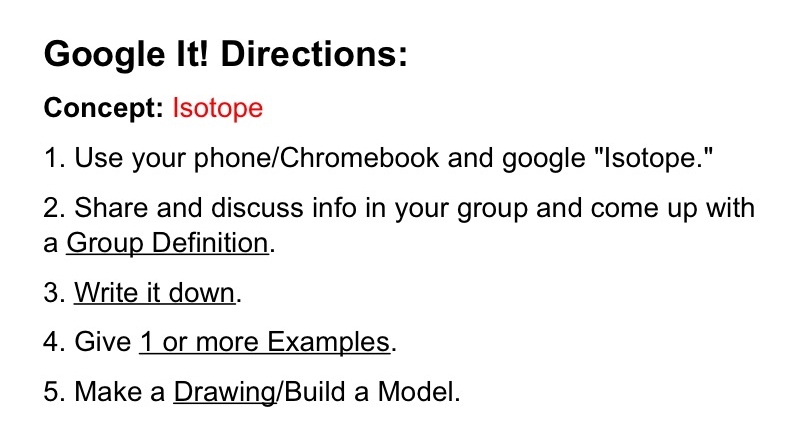
I went over the directions and reiterated cooperation. I repeated the directions and gave them the go-ahead.
Off they went googling "isotopes." Starting out with this activity instead of direct instruction allowed me to walk around the room, talk to students, ask questions, redirect the ones who needed it, and get a glimpse into how my students learn. I could make corrections if I saw misconceptions forming and provide guidance on group work.
I found that some students are programmed by years of "same old." Instead of looking the concept up and collaborating on a group definition they'd take notes in their notebook and maybe try to discuss what they wrote later. Being in the space with them, as opposed to lecturing about isotopes from the front, allowed me to constructively explain to them the benefits of the collaborative approach. I communicated to them that I know they are good students trying to do the right thing, it's just that i wanted to show them a new way.
We collaborate every day. Group work is not this "once in a while" deal. We are getting there, but it's a process...
One group copied a definition they found on the web using a word or two that were new to them. I asked if that is the definition they want to "own" and will be likely to remember. The answer they gave was no, and they rewrote it in a way they felt would be more memorable.
One of the groups in my 4th hour team class was kind of squirrely. It was easier to redirect them and point them in the right direction, because I was able to talk to their group directly. They were distracted, but weren't called out in public. I sat down on an ottoman next to them. It was non-threatening. No power struggle ensued. They even asked for the clarification of a couple of concepts. They learned.
After each group finished with their definitions, examples, and drawings, I asked for their attention and proceeded to short direct instruction and practice.
I was able to curate the content as the students were working in their groups, so everyone had the "right stuff." Students volunteered the information as I asked leading questions. I wrote it on the board. Here are the 3rd hour notes.
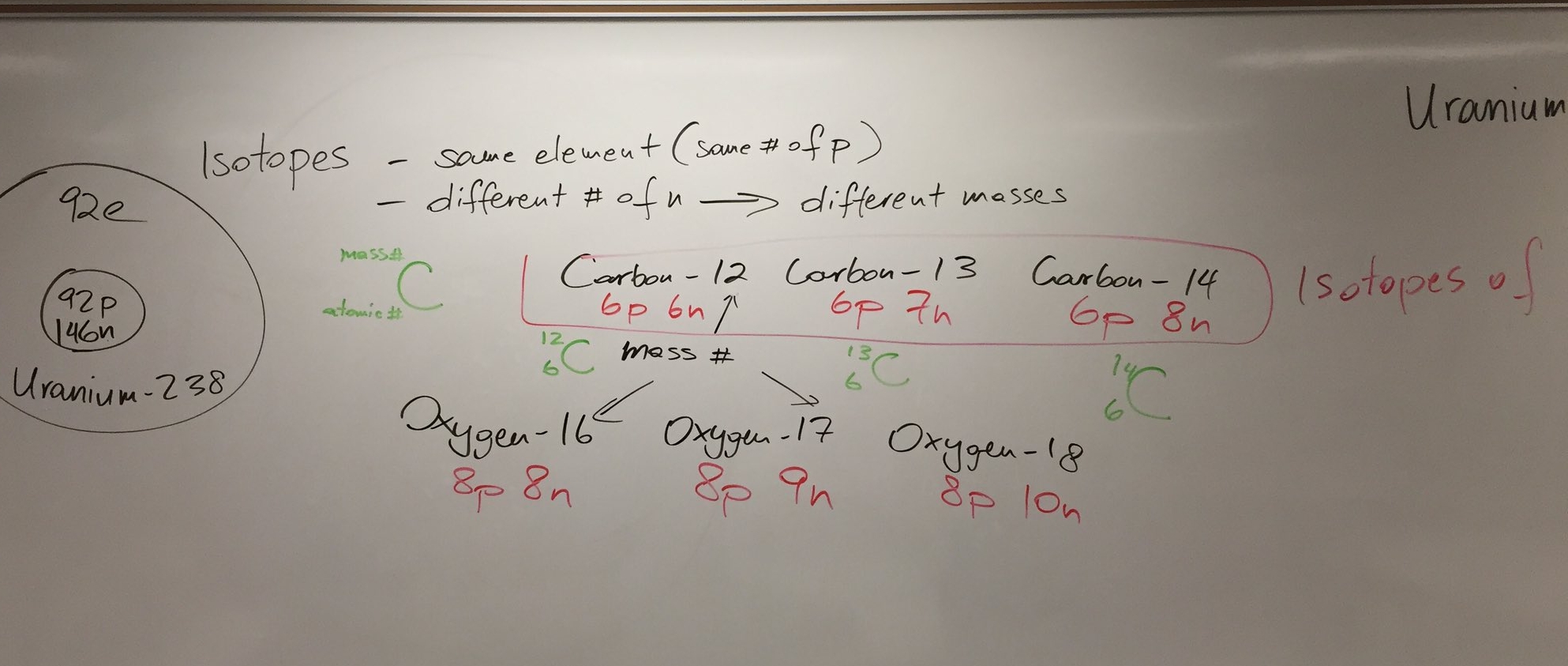
Finally, I had students practicing figuring out the number of protons, neutrons, and electrons if given the isotope notations (hyphen notation or the nuclear notation). They rotated through by each student doing one practice problem, while others help him/her if need be. This also allowed me to check in with students in between problems.
I really felt I was able to get a lot of feedback on my students' understanding, because the wall has fallen. The teacher desk is gone. I let students teach themselves. I share the physical space with them. I can help them more in smaller groups. i can give them more attention individually.
I have to be honest here - I am sometimes concerned with using technology to replace instructional methods. But now I am finding myself using technology and the space I created to enhance instruction.
I have a strong suspicion it's working. More to come...
What do you think about the "Google It" activity I came up with this Tuesday morning? Do you see it as something you can use? Let me know in the comments below. Thanks for reading!
You Have The Power To Change The World. Use It Often.